
Download BeFaster – internet speed, ADSL optimization, performance enhancement, connection speed, network settings
Overview
BeFaster is a specialized utility designed to improve the performance of ADSL internet connections through targeted network parameter optimization. The app addresses common challenges associated with slow or unstable broadband connections, such as lag, buffering, and inefficient data transmission. By adjusting key system-level settings, BeFaster aims to deliver a smoother and faster browsing experience for users relying on ADSL technology. This tool is particularly relevant for individuals in areas with limited access to high-speed fiber networks, where maximizing the potential of existing infrastructure is crucial.
Target users include home users, remote workers, and small office environments seeking to enhance their internet performance without upgrading hardware or service plans. The software is especially useful for those who experience inconsistent speeds despite having a stable connection. BeFaster Software, the developer, has positioned this application as a lightweight solution focused on practical network tuning. While the company’s background is not detailed, the app’s longevity—first released in 2015—suggests ongoing relevance in niche technical circles.
Real-world use cases include reducing video call delays, improving online gaming responsiveness, and accelerating web page load times. In the broader app ecosystem, BeFaster fills a gap for users who want to fine-tune their connection without resorting to complex router configurations or third-party tools. Its focus on ADSL-specific optimization sets it apart from generic speed booster apps that lack technical precision.
Key Features & Functionality
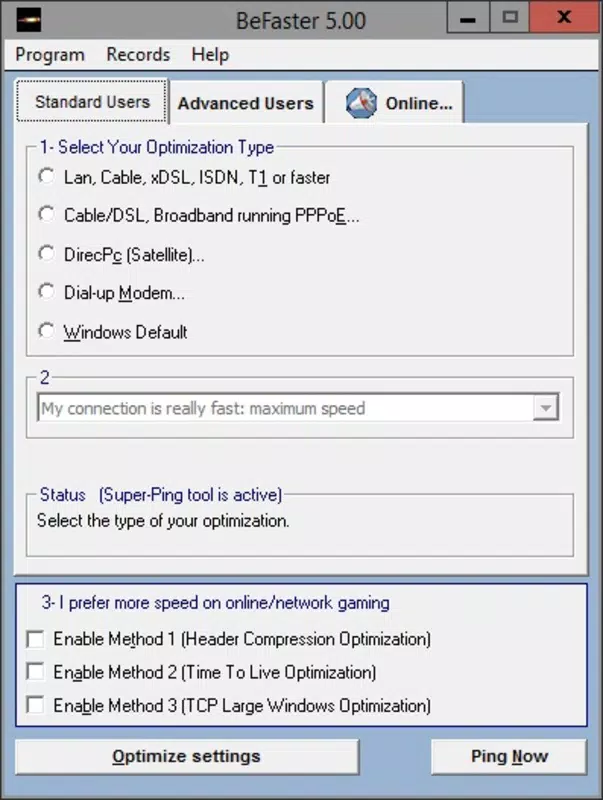
- Standard Mode Automation – This feature enables users to optimize their ADSL connection with a single click. The software automatically detects and adjusts optimal network parameters, making it ideal for non-technical users who want immediate improvements without deep configuration.
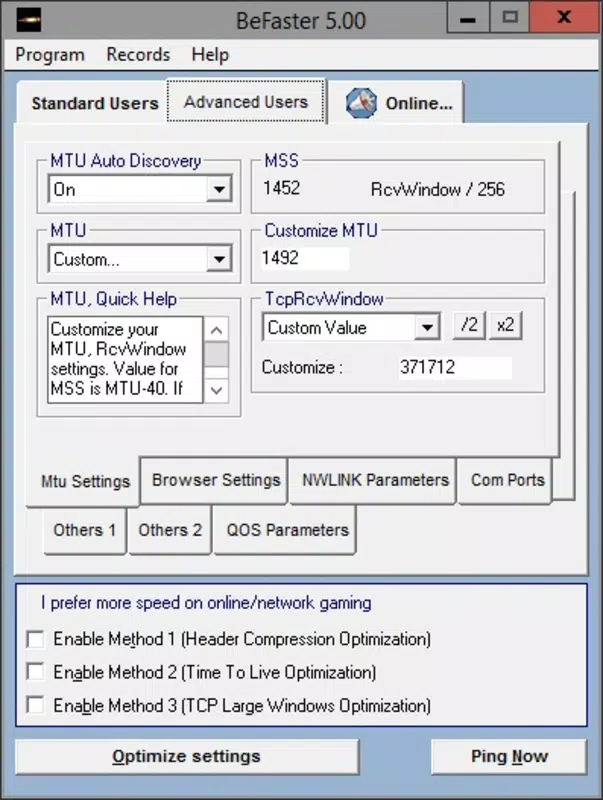
- Advanced Customization Mode – For users with technical knowledge, this mode allows manual adjustment of critical settings such as MTU (Maximum Transmission Unit), QoS (Quality of Service), and NWLINK protocols. This level of control supports tailored performance tuning based on specific network conditions.
- Browsing Options Optimization – BeFaster modifies browser-related network settings to reduce latency and improve data transfer efficiency. This can lead to faster website rendering and reduced loading times, especially on bandwidth-heavy sites.
- Com Port Configuration Tools – The app provides options to configure communication ports, which can enhance data transmission reliability when using hardware devices connected via serial or USB interfaces.
- Intuitive User Interface – Designed with usability in mind, the interface allows seamless navigation between modes and settings. Clear labels and logical layout help users apply changes efficiently, minimizing the risk of misconfiguration.
For example, a remote worker experiencing lag during video meetings could use Standard Mode to instantly improve connection stability. Meanwhile, a tech-savvy user might use Advanced Mode to fine-tune MTU size based on their ISP’s recommendations, potentially reducing packet loss and jitter.
Interface, UX & Performance
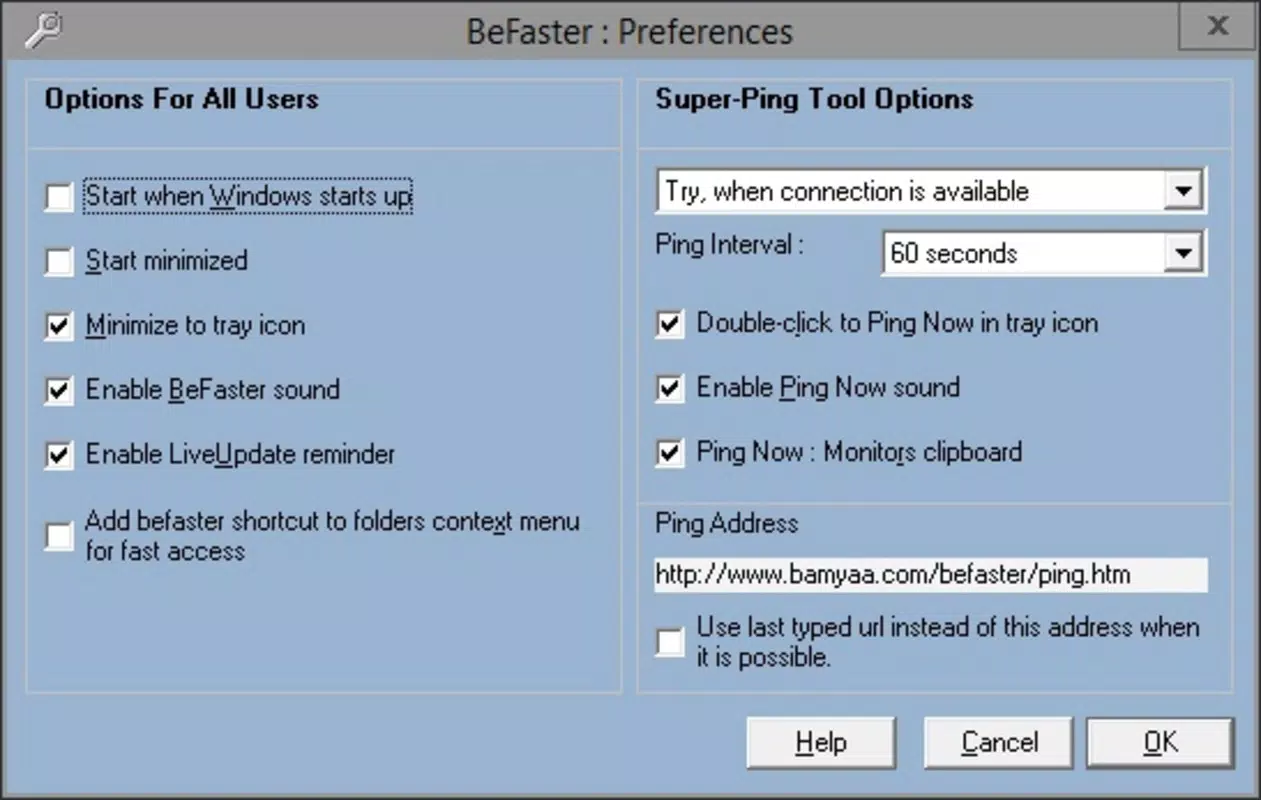
BeFaster features a clean, minimalistic interface that prioritizes accessibility and clarity. The layout organizes core functions into distinct sections—Standard Mode, Advanced Settings, and Configuration Tools—ensuring users can quickly locate desired options. Visual design is functional rather than decorative, with text-based controls and toggle switches that reflect current settings.
Navigating between modes is straightforward, with no confusing menus or hidden functions. The app maintains consistent responsiveness across different screen sizes and resolutions, although specific performance benchmarks were not provided by the developer. Although the developer did not list formal performance metrics, the app’s lightweight footprint of 2.4 MB suggests minimal system impact.
Users can expect stable operation during typical use, with no reported crashes or freezes in available documentation. The software operates efficiently on modern Windows systems, though compatibility with older versions was not specified. Overall, the user experience is streamlined and focused, avoiding unnecessary complexity while delivering meaningful control over network behavior.
Platform Compatibility & Technical Requirements
BeFaster is designed for the Windows platform and is compatible with Windows operating systems. The current version is 1.0.0, with a file size of 2.4 MB, making it a compact utility that does not consume significant storage space. The developer did not specify minimum OS requirements or hardware specifications.
Given its release date in 2015 and continued availability, it is likely compatible with Windows 7 and later versions. However, users should verify compatibility with their specific system configuration, especially if running older or non-standard Windows editions. The app does not require administrative privileges for basic operation, but certain advanced settings may prompt permission requests.
Pros and Cons
Pros
- Lightweight design with minimal system resource usage
- Simple one-click optimization for non-technical users
- Advanced settings for experienced users seeking customization
- Free to download and use, with no in-app purchases
- Targeted optimization for ADSL connections, not generic speed boosting
Cons
- Developer did not provide detailed system requirements
- No official updates since 2015; may lack support for newer Windows versions
- Specific performance improvements are not quantified
- Not available on mobile platforms or macOS
- Limited documentation or user guides beyond basic on-screen help
FAQ
Is BeFaster safe to install?
Yes, BeFaster is a free utility developed by BeFaster Software. It does not contain malware or intrusive behavior. However, users should ensure they download the app from official sources to avoid tampered versions.
Can I use BeFaster on Windows 10 or Windows 11?
While the developer did not specify compatibility, the app’s lightweight nature and release date suggest it may work on Windows 10 and 11. However, users should test it on their system to confirm functionality.
Does BeFaster require admin rights?
Basic operation does not require administrative privileges. However, certain advanced features may prompt permission requests during configuration.
Is BeFaster available for Android or iOS?
No, BeFaster is currently only available for Windows. There is no official mobile version for Android or iOS devices.
How often should I update BeFaster?
As of the latest release in 2015, no updates have been issued. Users should exercise caution and verify the authenticity of any downloaded version, as outdated software may not function correctly on modern systems.
Final Thoughts
BeFaster remains a niche but functional tool for users seeking to enhance their ADSL connection through system-level tuning. Its dual-mode design—offering both automation and manual control—caters to a broad range of users, from beginners to advanced network enthusiasts. While the lack of recent updates raises concerns about long-term compatibility, the app’s core functionality remains relevant for those with older Windows systems and stable ADSL lines.
For individuals who experience suboptimal internet performance and are unwilling or unable to upgrade their service, BeFaster provides a practical, no-cost solution. Its focus on real network parameters, rather than misleading “speed boost” claims, reflects a responsible approach to performance enhancement.
Download BeFaster now


